Skip to content
oma

Local Machine

Wire your own machine into the platform

The control plane stays on OMA — sessions, event logs, and history live where they always do. But the sandbox and any local ACP agent (Claude Code, Codex, Grok Build) can run on hardware you already own, paired with one command and no inbound ports.

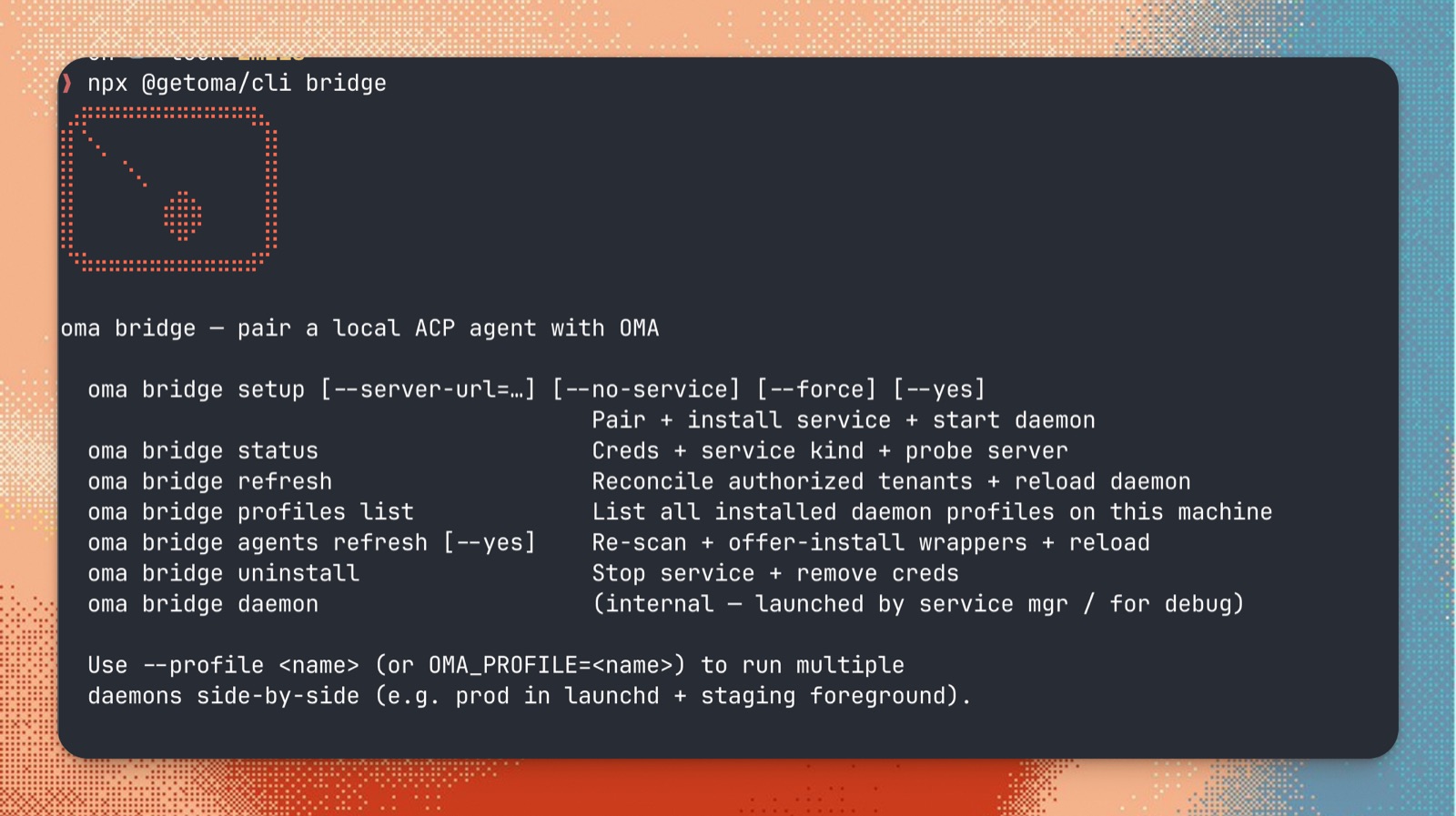
The oma CLI running on a local Mac — pairing the bridge daemon

$ npx @getoma/cli bridge setup — on your Mac

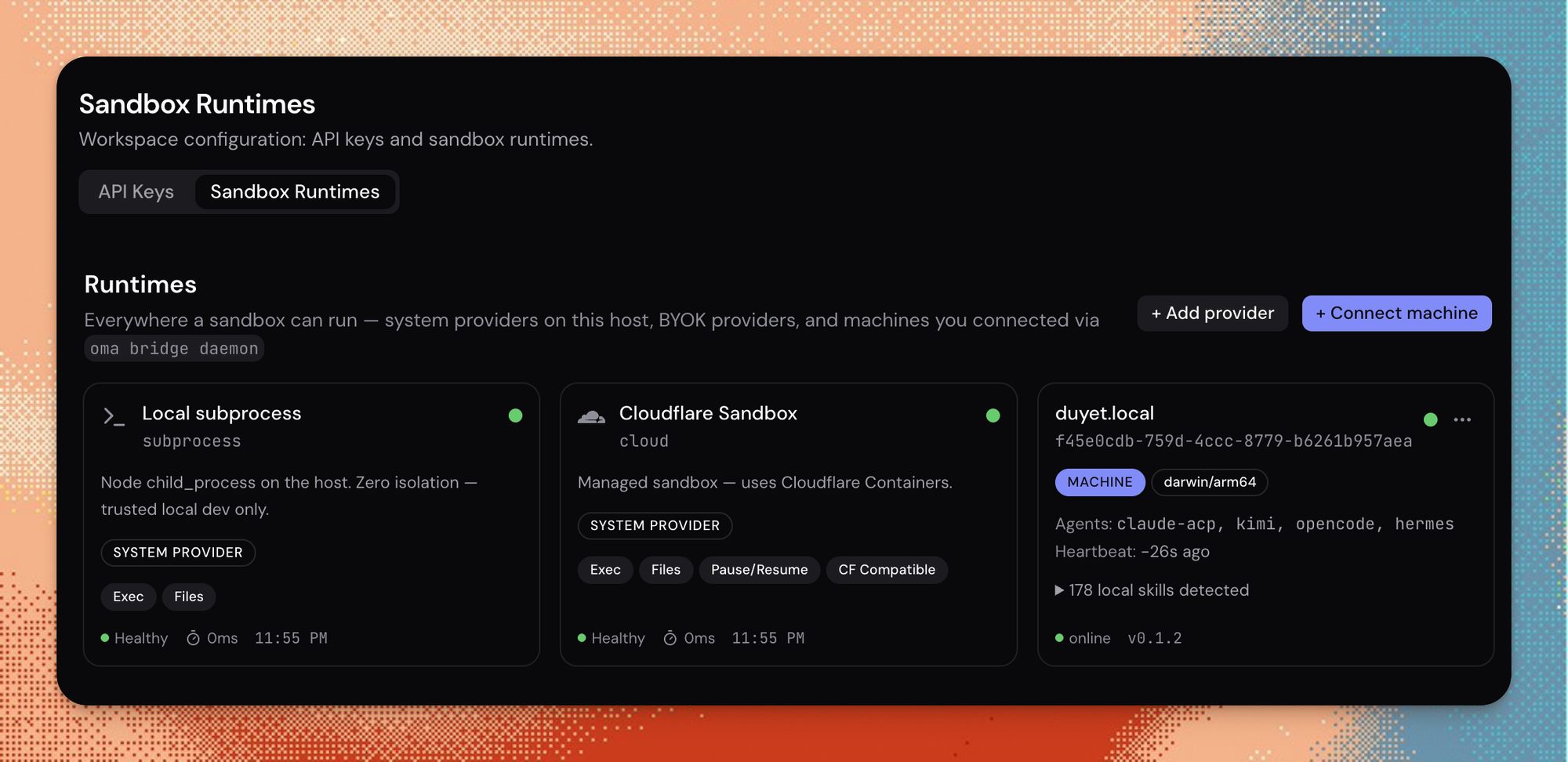
Console Sandbox Runtime page showing the paired local machine as a runtime

…and the same machine live on the Sandbox Runtimes page

How it works

A lightweight bridge daemon pairs your machine with your tenant. From then on, each sandbox operation — exec, read/write files, set env vars, destroy — is relayed to your most-recently-heartbeated daemon over the RuntimeRoom Durable Object WebSocket, executed locally, and streamed back to the session. Because the daemon only dials out, it works identically behind NAT, a home router, or a locked-down corporate firewall.

Outbound-only

The daemon dials out over WebSocket. Nothing listens on your machine, no port-forwarding, works behind NAT.

Self-healing

25s heartbeats with a liveness watchdog; silent drops reconnect automatically with jittered backoff.

Scoped & revocable

Paired per tenant with its own token — revoke from the Console or oma runtime rm at any time.
Pair a machine

terminal
$ npx @getoma/cli bridge setup

oma bridge  v0.1.3

✓ paired macbook-pro.local with app.oma.duyet.net
✓ daemon installed as a background service
✓ connected — heartbeat 25s, auto-reconnect on

This machine now appears on the Console's
Sandbox Runtime page. No wrangler secrets, no
manual server to run.
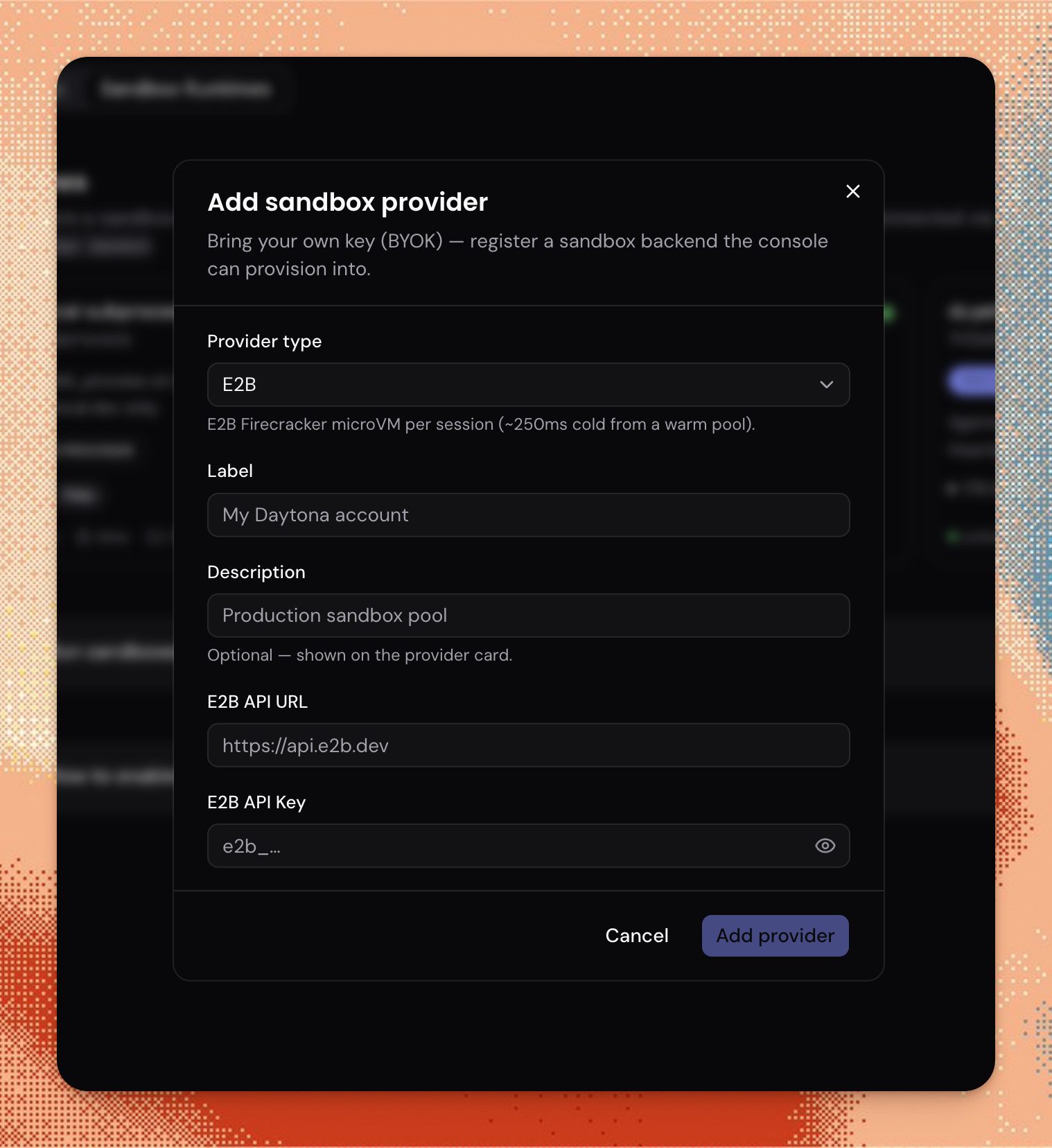
Console dialog for adding a sandbox provider

What you get, and what's still missing

What you get

  • Sandbox exec, file read/write, and env vars all run locally, streamed back to the session in real time.
  • Local ACP agents — Claude Code, Codex, Grok Build — run against the same paired machine.
  • No cloud sandbox spend for work you can run on hardware you already own.
  • Works behind NAT and corporate firewalls with zero inbound rules.
  • Prefer a whole cluster? See Private Kubernetes — same control plane, Helm-installed worker.

Known limitations

  • git over HTTPS and plain http:// calls are vault-injected via a loopback proxy. gh, curl https://…, and other own-TLS tools still use the machine's credentials (OMA does not install a CA).
  • Memory-store and session-outputs mounts aren't wired for bridged sandboxes.
  • If no runtime is online, the first sandbox op fails clearly with a session.error rather than queuing silently.

FAQ

Is the bridge connection secure?

The daemon only dials out — nothing listens on your machine, so there is no inbound port to attack. The connection is an authenticated WebSocket scoped to your tenant, and you can revoke it at any time from the Console or with `oma runtime rm`.

What happens if my machine goes offline?

The daemon sends a heartbeat every 25 seconds. If it goes quiet, the platform marks the runtime unavailable and any sandbox op relayed to it fails clearly with a session.error instead of hanging. The daemon itself reconnects automatically with jittered backoff once the machine is back online.

Can I run Claude Code locally through it?

Yes — local ACP agents such as Claude Code, Codex, and Grok Build run against the paired machine the same way sandbox ops do, streamed back over the same RuntimeRoom connection.

Does it need open ports or firewall changes?

No. The daemon makes an outbound WebSocket connection only, so it works behind NAT and corporate firewalls without port-forwarding or inbound rules.

What doesn't work yet on a bridged machine?

The subprocess relay injects vault credentials for git over HTTPS and plain http:// calls via a loopback proxy. Tools that open their own TLS session (gh, curl https://…) still use this machine's credentials, because OMA does not install a machine-wide CA. Memory-store mounts are not wired for bridged sandboxes.